OpenAPI
This document explains how to use the bit-Agent OpenAPI so developers can integrate bit-Agent capabilities through an API.
Get an API Key
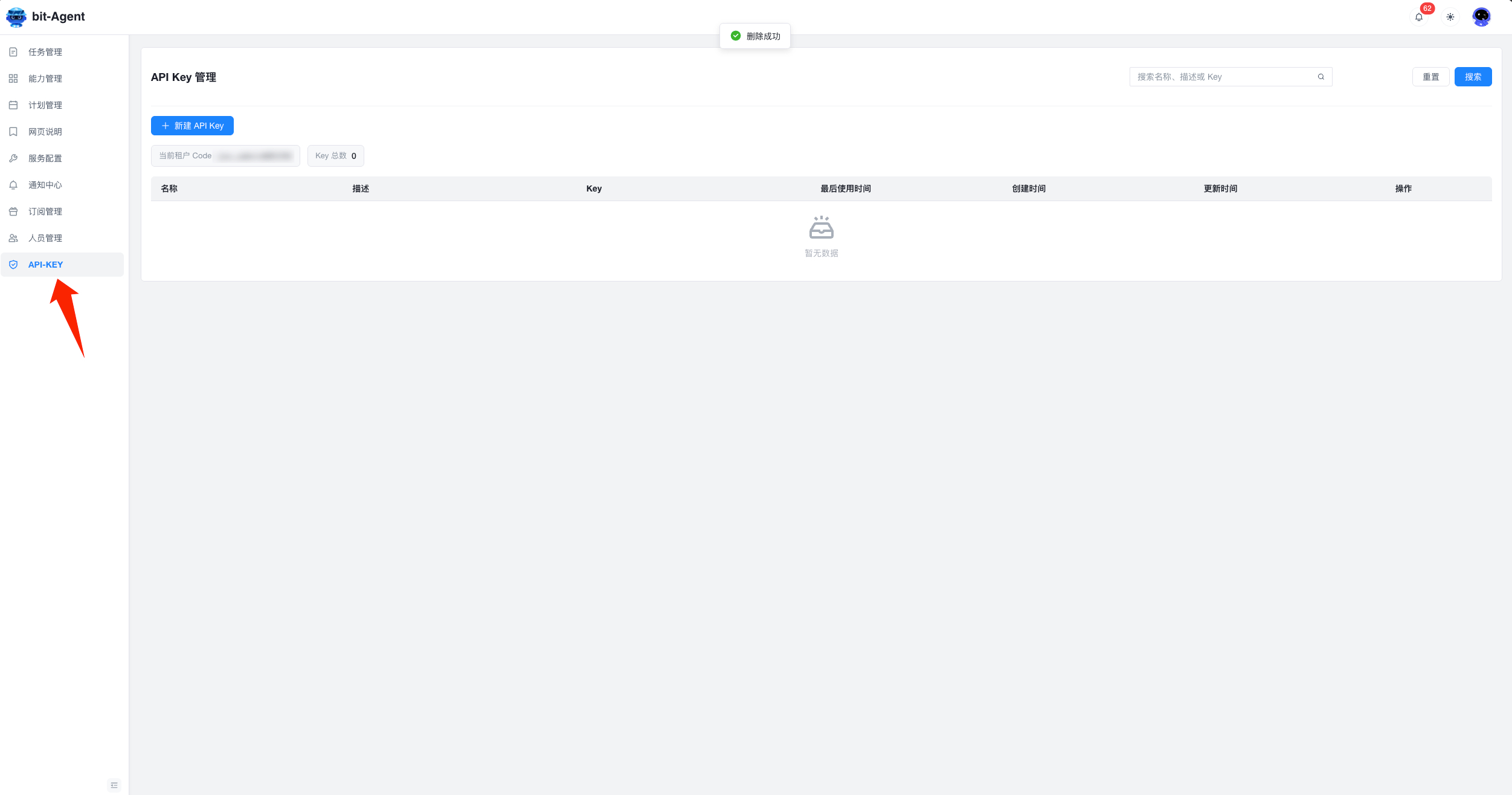
Administrators of enterprise tenants can see an API-KEY menu in the console and create an API key there.
You can also see the tenant code on the same page. Some APIs require it.
Basics
- Base URL:
https://bitagent.ninetechone.com/api - All APIs use
/v3/openapias the prefix - Request / response format: JSON
- Authentication: Bearer Token, passed through the
Authorizationheader or theaccess_tokenquery parameter
Unified Response Format
{
  "code": "200",
  "message": "",
  "data": {}
}
code: response status code."200"means successmessage: error message when a request failsdata: response payload, with a schema that depends on the specific API
End-to-End Example: From Authentication to Task Execution
The example below connects the core APIs into one workflow:
get a token -> browse capabilities -> inspect details -> create a task -> monitor it in real time -> get the final result
Step 1: Get an Access Token
curl -X POST '{{BASE_URL}}/v3/openapi/auth/user-token' \
  -H 'Authorization: <your-api-key>' \
  -H 'Content-Type: application/json' \
  -d '{
    "user_id": "user_001",
    "tenant_code": "my-tenant"
  }'
Response:
{
  "code": "200",
  "data": {
    "access_token": "eyJhbGciOiJIUzI1NiIs...",
    "token_type": "Bearer",
    "expires_in": 86400
  }
}
All subsequent APIs use this access_token for authentication. The token is generated from the supplied user_id and carries that user's identity. Whoever holds the token acts with the same data and operation permissions as that user, so keep it safe.
Step 2: Query Available Capabilities
curl -X POST '{{BASE_URL}}/v3/openapi/ability/page' \
  -H 'Authorization: Bearer eyJhbGciOiJIUzI1NiIs...' \
  -H 'Content-Type: application/json' \
  -d '{
    "page_index": 0,
    "page_size": 10,
    "name": "data collection"
  }'
Response:
{
  "code": "200",
  "data": [
    {
      "id": "ability_001",
      "name": "Web Data Collection",
      "description": "Collect data from a target web page and extract structured information",
      "created_by_id": "admin",
      "created_by_name": "Administrator",
      "created_at": "2025-01-01T00:00:00"
    }
  ],
  "total": 1
}
Step 3: View Capability Details
curl -X GET '{{BASE_URL}}/v3/openapi/ability/detail/ability_001' \
  -H 'Authorization: Bearer eyJhbGciOiJIUzI1NiIs...'
Response:
{
  "code": "200",
  "data": {
    "id": "ability_001",
    "name": "Web Data Collection",
    "description": "Collect data from a target web page and extract structured information",
    "inputs": {
      "type": "object",
      "properties": {
        "url": { "type": "string", "description": "Target URL", "format": "uri" },
        "selector": { "type": "string", "description": "CSS selector" }
      },
      "required": ["url"]
    },
    "outputs": {
      "type": "object",
      "properties": {
        "data": {
          "type": "array",
          "items": {
            "type": "object",
            "properties": {
              "title": { "type": "string" },
              "price": { "type": "number" }
            }
          }
        }
      }
    },
    "config": {}
  }
}
inputs defines the payload that must be passed when creating the task, and outputs defines the structure returned after the task succeeds.
Step 4: Optionally Query Available LLM Models
curl -X GET '{{BASE_URL}}/v3/openapi/common/llm_names' \
  -H 'Authorization: Bearer eyJhbGciOiJIUzI1NiIs...'
Response:
{
  "code": "200",
  "data": ["Qwen", "GPT-4o", "DeepSeek-V3"]
}
Step 5: Create a Task
curl -X POST '{{BASE_URL}}/v3/openapi/task/create' \
  -H 'Authorization: Bearer eyJhbGciOiJIUzI1NiIs...' \
  -H 'Content-Type: application/json' \
  -d '{
    "ability_id": "ability_001",
    "executor_type": "cloud",
    "inputs": {
      "url": "https://example.com",
      "selector": ".price"
    },
    "extensions": {
      "use_incognito": false,
      "skip_error": false,
      "close_browser": true,
      "llm_name": "Qwen3"
    }
  }'
Response:
{
  "code": "200",
  "data": "task_12345"
}
The data field is the task ID used for later queries and monitoring.
Step 6: Monitor Task Execution in Real Time
curl -N '{{BASE_URL}}/v3/openapi/task/stream/task_12345' \
  -H 'Authorization: Bearer eyJhbGciOiJIUzI1NiIs...'
The server pushes events continuously through SSE:
event: step
data: {"step_id":"step_001","index":1,"activity_name":"Open Browser","activity_icon":"🌐","purpose":"Visit target website","status":"waiting"}

event: step-event
data: {"step_id":"step_001","status":"running","message":"Loading page..."}

event: thinking
data: I need to locate the price element first...

event: step-event
data: {"step_id":"step_001","status":"ok"}

event: close
data: close
Step 7: Get the Task Result
curl -X GET '{{BASE_URL}}/v3/openapi/task/detail/task_12345' \
  -H 'Authorization: Bearer eyJhbGciOiJIUzI1NiIs...'
Response:
{
  "code": "200",
  "data": {
    "id": "task_12345",
    "ability_id": "ability_001",
    "ability_name": "Web Data Collection",
    "executor_type": "cloud",
    "state": "success",
    "created_at": "2025-01-01T10:00:00",
    "started_at": "2025-01-01T10:00:01",
    "ended_at": "2025-01-01T10:02:25",
    "duration": 145,
    "inputs": { "url": "https://example.com", "selector": ".price" },
    "outputs": {
      "data": [
        { "product": "Product A", "price": 99.99 },
        { "product": "Product B", "price": 149.0 }
      ]
    }
  }
}
Step 8: Optionally Cancel a Task
curl -X POST '{{BASE_URL}}/v3/openapi/task/cancel/task_12345' \
  -H 'Authorization: Bearer eyJhbGciOiJIUzI1NiIs...'
API Reference
1. Authentication
POST /v3/openapi/auth/user-token
Creates a user access token for all subsequent OpenAPI requests.
Headers:
| Parameter | Type | Required | Description |
|---|---|---|---|
| Authorization | string | Yes | API key used to authenticate the caller |
Request body:
| Parameter | Type | Required | Description |
|---|---|---|---|
| user_id | string | Yes | Unique user identifier, 1-128 characters |
| tenant_code | string | Yes | Unique tenant code, 1-128 characters |
Response data:
| Field | Type | Description |
|---|---|---|
| access_token | string | JWT access token |
| token_type | string | Always Bearer |
| expires_in | integer | null | Expiration in seconds, or null for no expiration |
Error codes:
- 401: invalid or missing API key
- 403: tenant mismatch
- 400: invalid
user_idortenant_codeformat
2. Capability Management
POST /v3/openapi/ability/page
Queries a paginated capability list and supports fuzzy search by name.
Request body:
| Parameter | Type | Required | Default | Description |
|---|---|---|---|---|
| page_index | integer | No | 0 | Page index, starting from 0 |
| page_size | integer | No | 10 | Page size, max 100 |
| name | string | No | - | Fuzzy match by name |
Response data (array):
| Field | Type | Description |
|---|---|---|
| id | string | Capability ID |
| name | string | Capability name |
| description | string | null | Capability description |
| created_by_id | string | Creator ID |
| created_by_name | string | Creator name |
| created_at | datetime | Creation time |
The response also contains a total field indicating the total number of records.
GET /v3/openapi/ability/detail/{ability_id}
Gets full capability details, including input/output definitions and configuration parameters.
Path parameters:
| Parameter | Type | Required | Description |
|---|---|---|---|
| ability_id | string | Yes | Capability ID |
Response data:
| Field | Type | Description |
|---|---|---|
| id | string | Capability ID |
| name | string | Capability name |
| description | string | null | Capability description |
| inputs | object | Input definition in JSON Schema format |
| outputs | object | Output definition in JSON Schema format |
| config | object | Capability configuration |
3. Common Services
GET /v3/openapi/common/llm_names
Returns the list of LLM names available to the current user. These names can be passed to extensions.llm_name when creating a task.
Response data: string[]
GET /v3/openapi/common/file/{file_id}
Gets file metadata by file ID.
Path parameters:
| Parameter | Type | Required | Description |
|---|---|---|---|
| file_id | string | Yes | File ID |
Response data:
| Field | Type | Description |
|---|---|---|
| name | string | null | File name |
| url | string | null | Download URL |
POST /v3/openapi/common/file/upload
Uploads a file using multipart/form-data.
Request body:
| Parameter | Type | Required | Description |
|---|---|---|---|
| file | binary | Yes | File to upload |
curl -X POST '{{BASE_URL}}/v3/openapi/common/file/upload' \
  -H 'Authorization: Bearer eyJhbGciOiJIUzI1NiIs...' \
  -F 'file=@/path/to/file.xlsx'
Response data: object containing uploaded file information
4. Task Management
POST /v3/openapi/task/create
Creates a task and returns the task ID. Supports both client execution and cloud execution.
Request body:
| Parameter | Type | Required | Description |
|---|---|---|---|
| ability_id | string | Yes | Capability ID to execute |
| executor_type | string | Yes | Executor type: client or cloud |
| executor_id | string | No | Executor ID. Used only when executor_type=client. If omitted, the task is sent to the most recently online client. |
| inputs | object | No | Input values, which must match the capability's input schema |
| extensions | object | No | Extra execution config |
Extensions:
| Parameter | Type | Default | Description |
|---|---|---|---|
| use_incognito | boolean | false | Run in incognito mode |
| skip_error | boolean | false | Ignore step errors and continue |
| close_browser | boolean | false | Close the browser when the task ends |
| llm_name | string | null | null | Specify the LLM model name; omitted means use the default |
Response data: string task ID
GET /v3/openapi/task/detail/{task_id}
Gets task details, including execution state, inputs, outputs, and timing information.
Path parameters:
| Parameter | Type | Required | Description |
|---|---|---|---|
| task_id | string | Yes | Task ID |
Response data:
| Field | Type | Description |
|---|---|---|
| id | string | Task ID |
| ability_id | string | Related capability ID |
| ability_name | string | Capability name snapshot |
| executor_type | string | Executor type |
| executor_id | string | null | Executor ID |
| state | string | pending / running / success / failed / cancelled / paused / terminated |
| error_message | string | null | Error message when failed |
| created_by | object | Creator info with id and name |
| created_at | datetime | Creation time |
| started_at | datetime | null | Start time |
| ended_at | datetime | null | End time |
| duration | integer | null | Duration in seconds |
| inputs | object | Input snapshot |
| outputs | object | null | Output results, usually available in success state |
| extensions | object | Extension config snapshot |
| aux_infos | object | Auxiliary snapshot such as capability metadata |
POST /v3/openapi/task/cancel/{task_id}
Cancels a task that is waiting or running. Completed, failed, or already cancelled tasks cannot be cancelled again.
Path parameters:
| Parameter | Type | Required | Description |
|---|---|---|---|
| task_id | string | Yes | Task ID |
Response data: string
GET /v3/openapi/task/stream/{task_id}
Streams task execution through SSE in real time.
Path parameters:
| Parameter | Type | Required | Description |
|---|---|---|---|
| task_id | string | Yes | Task ID |
Event types:
| Event | Description | Data format |
|---|---|---|
step | Step created | {"step_id", "index", "activity_name", "activity_icon", "purpose", "status"} |
step-event | Step updated | {"step_id", "status", "message", "screenshots", "outputs", "datas", "files", "labels"} |
thinking | Reasoning trace | plain text |
message | LLM message | plain text |
error | Error event | plain text |
card | Card display | {"title", "style", "body", "actions"} |
close | Stream closed | plain text |
Step status enumeration: waiting -> running -> ok / fail / abandoned
GET /v3/openapi/task/space_view
Gets the task space view, including files, memos, and step tree.
Query parameters:
| Parameter | Type | Required | Description |
|---|---|---|---|
| task_id | string | Yes | Task ID |
Response data:
| Field | Type | Description |
|---|---|---|
| files | array | File list with id, origin, name, desc, and text_content |
| memos | array | Memo list with id, type, and content |
| steps | array | Step tree node list |
5. Session Management
POST /v3/openapi/session/create
Creates a new session.
Request body:
| Parameter | Type | Required | Description |
|---|---|---|---|
| client_id | string | Yes | Client ID |
Response data: string session ID
POST /v3/openapi/session/chat
Sends a message in the session and returns an SSE stream.
Request body:
| Parameter | Type | Required | Description |
|---|---|---|---|
| session_id | string | Yes | Session ID |
| client_id | string | Yes | Client ID |
| text | string | null | No | Text content |
| files | string[] | null | No | Uploaded file ID list |
GET /v3/openapi/session/space_view
Gets the session space view.
Query parameters:
| Parameter | Type | Required | Description |
|---|---|---|---|
| session_id | string | Yes | Session ID |
Response data: same structure as task space_view, including files, memos, and steps