Configure MCP Services
Before reading this chapter, please review the official MCP protocol documentation and obtain the services you need.
For development, you can refer to:
We recommend following the approach used in the official tutorials when building MCP services. If you use Python, prefer the official package.
Configure Local MCP Services
Local MCP services have two characteristics:
- They are installed on the local computer, and the same MCP configuration is shared across different users who sign in on that machine.
- Step editing is not supported. If you need a shareable setup, prefer MCP services configured in the console.
1. Obtain an MCP Server
Before configuring bit-Agent, download and deploy an MCP server first.
You can refer to the official MCP examples and choose a suitable service, for example:
- filesystem: access to the local file system
- sqlite: access an SQLite database through MCP
- custom: your own custom capability service
2. Configure the MCP Server in bit-Agent
- Open the bit-Agent application.
- Click the
Settingsicon in the upper-right corner. - In Settings, open
Service Configuration. - In the
MCP Serversection, enter the configuration according to the MCP service protocol. The example below configures the officialfilesystemandsqliteservices. Fill in the paths according to your actual environment:
{
  "mcpServers": {
    "filesystem": {
      "command": "cmd",
      "args": [
        "/c",
        "npx",
        "-y",
        "@modelcontextprotocol/server-filesystem",
        "D:\\agent\\data"
      ]
    },
    "sqlite": {
      "command": "cmd",
      "args": [
        "/c",
        "uvx",
        "--directory",
        "D:\\agent\\servers-main\\src\\sqlite",
        "mcp-server-sqlite",
        "--db-path",
        "D:\\agent\\data\\test.db"
      ]
    }
  }
}
- After configuration, click
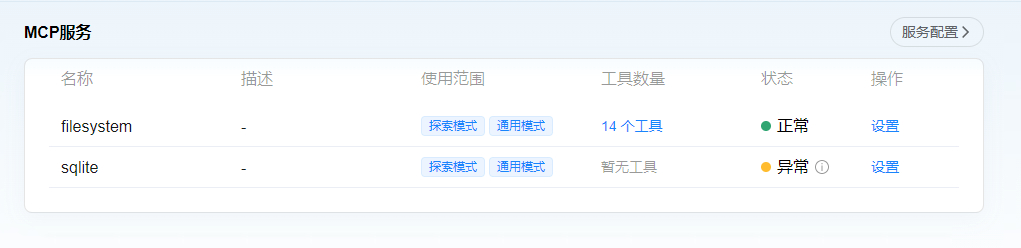
Save. bit-Agent will automatically start the corresponding services. A successfully started service shows the statusNormal; otherwise it showsAbnormal. Services in an abnormal state cannot be used.
- Click
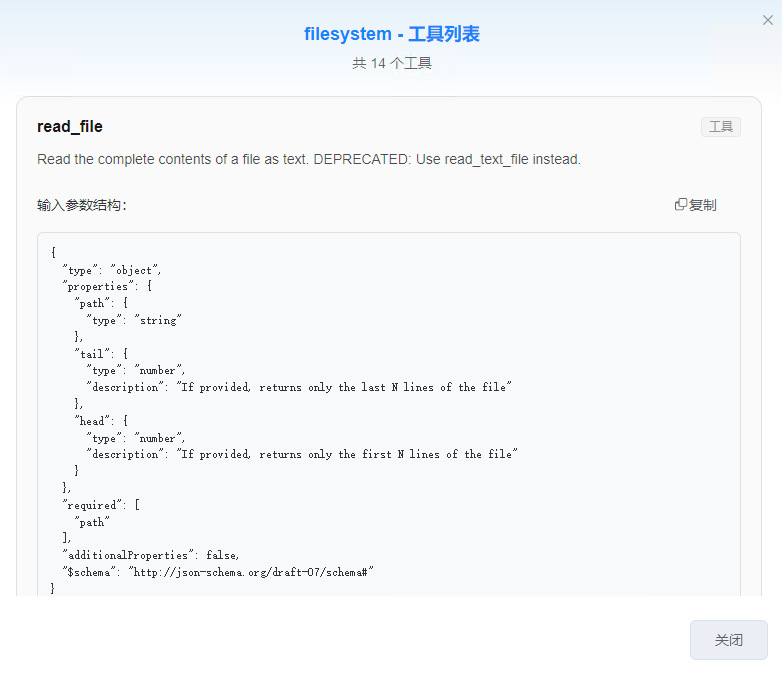
Toolsto view the tools exposed by that service.
- In Settings, you can choose which modes the service is available in. By default, it can be used in both exploration mode and general mode.
Auto-Loading from bit-Crew
Starting from V3.3, if you have already configured and enabled MCP services in bit-Crew, bit-Agent can load those available services automatically, without requiring duplicated configuration in the client.
Typical Use Cases
- Your team manages MCP services centrally in bit-Crew
- You want to reuse the same service configuration across multiple endpoints
Recommendations
- On first use, confirm in a conversation that the tools have appeared
- If they do not appear automatically, check account permissions and service status, then try again
What is MCP?
MCP (Model Control Protocol) is an open-protocol standard for providing large language models with secure, extensible access to external tools and data.
Through MCP, AI applications such as intelligent agents, IDE plugins, or enterprise AI platforms can communicate with multiple external services in a standard way, enabling access to:
- Local file systems, such as reading and writing files
- Databases, such as SQLite or PostgreSQL
- Remote API services, such as third-party business systems
- Internal enterprise services, such as knowledge bases or permission systems
With MCP, AI models can do more than understand and reason. They can safely execute real operations, such as querying databases, modifying configuration, or analyzing log files, which significantly expands both perception and execution boundaries.
How MCP Works
The MCP protocol defines the communication standard between models and external services.
It usually involves three main roles:
- MCP Server: a service that provides a certain capability or resource, such as a file system, database, or Web API
- MCP Client: the AI application that initiates requests, such as bit-Agent, an IDE plugin, or an LLM inference framework
- MCP Stream: the communication channel between the model and the service, typically based on WebSocket or Streamable HTTP
The interaction flow is:
- The client sends a request, such as "read file contents" or "run an SQL query"
- The server receives the request and executes the task
- The server returns a structured response
- The model continues making decisions or generating output based on that response